Virtual Printer – Elpako New Feature for Fast Document Signing
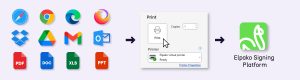
Signing documents directly from the print window isn’t new—but Elpako took a fresh approach and made it faster and even more intuitive. With the Virtual Printer, the process is as straightforward as:
Open → „Print” → Sign.
No pop-ups, no redundant steps—just a smooth, self-explanatory workflow. Fewer clicks. More efficiency.
Key Benefits
Simplicity
- Send your document directly to Elpako signing platform straight from the print window—no need to download, open your browser, or manually upload anything.
- The entire process takes less than 15 seconds.
Versatility
- Compatible with any application: Word, Excel, PDF, PowerPoint, JPG, PNG, browsers (Chrome, Edge, Firefox), documents from Google Drive, and emails from Outlook or Gmail.
- Automatically converts any file type into a PDF for signing.
Freedom of Choice
- Choose between a biometric or a qualified e-signature. You can sign the document yourself or invite someone else to sign.
- You see the document instantly and place your signature exactly where it needs to go—with a simple click or drag of your mouse.
Centralized Management
- All signed documents are securely stored on Elpako platform, with convenient tools for search, viewing, analysis, and exporting.
- You can track who has signed and easily resend the document for signing if needed.
Security
- All signatures meet eIDAS and ISO security standards, ensuring full legal validity.
- Because the document remains digital and never leaves the secure environment, risks like data leaks or printing errors are minimized.
When to Use the Virtual Printer vs. the Platform
The Virtual Printer is ideal when the document is already prepared and doesn’t require any additional information to be filled in—such as when an HR department sends a confidentiality agreement to a new employee for signature.
The platform is best suited for cases where the document needs to be both filled out and signed—for example, when a patient at a medical facility must provide details about their health condition and sign a consent form before a procedure.
How It Works – Step by Step
-
Install the Elpako Virtual Printer tool on your computer.
-
Open the print window in any program and select “Elpako Virtual Printer” from the printer list.
-
Log in to your Elpako biometric signing account (only needed the first time).
-
Choose your signature type: biometric or qualified e-signature.
-
Sign the document—it will be instantly saved on the Elpako platform.

Biometric vs. Qualified E-Signature – What’s the Difference?
Both signature types are legally valid, but they’re suited for different contexts—in-person or remote.
-
Biometric Signature
Best for in-person signing, such as at a customer service desk.
Signed using a tablet and digital pen, capturing unique traits like pressure, speed, and movement. -
Qualified E-Signature
Ideal for remote signing.
Uses Smart-ID, Mobile ID, or a national ID card. Legally equivalent to a handwritten signature.
Try It Today
The Virtual Printer is now available to all Elpako Biometric Signature users.
Try it out and experience a faster, simpler way to sign documents—right from your desktop.
More than just a signature: How the Biometric signature is transforming document management and customer experience
Some healthcare facilities use electronic devices, but these are often outdated, inconvenient, and insecure, as the signatures they capture are simple images with no authentication data. For example, private clinics that serve dozens of patients daily face long waiting times as patients need to sign documents related to treatment or data handling. These outdated document signing processes not only complicate administrative work but also force patients to wait longer.
Elpako Biometric Signature offers institutions a way to fully transition to electronic signatures, ensuring that each signature is authentic, secure, and legally recognized. This solution not only streamlines service processes, reduces queues, and eases administrative burdens, but also improves the overall customer experience by introducing a modern and convenient service model.
The technology allows the use of tablets and a special stylus to sign directly on digital documents. During signing, unique graphometric data such as pen angles, pressure, and speed are captured to create an authentic signature profile.
Furthermore, the platform offers a range of features designed to address real customer service challenges, optimize processes, and simplify daily tasks.
Features that improve customer service and document management
Document template creation
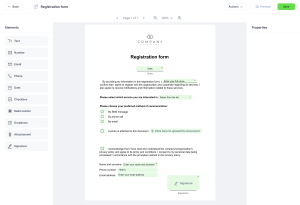
Every company has specific documents that need to be processed quickly and efficiently. Elpako Biometric Signature platform allows the creation of custom templates with fillable fields that can easily be applied to PDF or Word documents using a simple drag-and-drop method. This means your team can quickly generate standardized documents suitable for various situations, from contracts to order forms. Using these templates makes document management faster, more accurate, and less prone to errors.
Electronic signature functionality
Imagine that your client no longer has to wait for documents to be printed. The administrator simply selects a template and sends it to the tablet with a single click, where the document instantly appears for the client. The client can clearly see every filled field, and a guided animation helps them through each step of the process. Even those with little technology experience can easily complete the signing.
Assistance mode: convenient collaboration on two screens
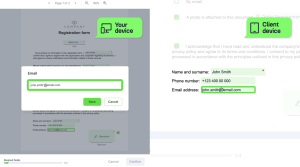
Elpako team noticed that in customer service centers, administrators often need to stand up, walk around the desk, or lean over it to help clients fill out forms. These awkward situations disrupt smooth service and often force administrators to fill in the information themselves, which isn’t fair to the client.
To address these challenges, the Elpako platform offers a unique feature where both the administrator and the client can work on the same document on two separate screens simultaneously. This ensures that both parties can view each filled field in real time, discuss any issues, and quickly correct inaccuracies. This feature helps avoid misunderstandings, improves communication quality, and builds trust between the company and its clients.
Automatic document storage and sharing
Documents often get lost or improperly stored, leading to disputes and dissatisfaction for both clients and employees. Elpako automates this process – once a document is completed and signed, it is stored in the internal document management system and immediately sent to the client via email. This eliminates the need for printing, as all documents are available in digital format at any time. This solution ensures that important information won’t be lost, reduces administrative costs, and saves time.
Personalized solutions
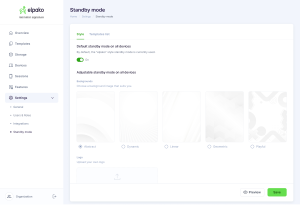
Every company values not only efficiency but also a unique brand image. Elpako Biometric Signature platform allows everything to be customized to match your brand’s style – from colors and fonts to logos, ensuring a seamless experience for your clients. Most importantly, the system works on various devices, such as phones or tablets, regardless of manufacturer or technical specifications. The tablet’s standby mode allows you to display your ads or other important information, while clients can select desired services directly from the screen, ensuring quick and convenient service.
Ready to transform your customer service?
Elpako clients have already seen how easy it is to switch to digital solutions. From small offices to large financial institutions, all of them enjoy faster service and smoother processes. This solution is easily adaptable not only at reception desks but also in private offices, such as law firms, and in companies without defined service locations, like auto repair shops. Even in mobile services like equipment installation, Elpako Biometric Signature features allow work to be done faster and more efficiently while at the client’s location.
Your business deserves solutions that help it grow and improve. Elpako is more than just a tool – it’s a path to modern, efficient, reliable, and secure document management that allows you to focus on what matters most – quality customer service and building trust. Are you ready to transform your approach to customer experience? Try Elpako today and feel the difference.
Try a demo
If you want to learn more about the Elpako Biometric Signature platform, our expert Rokas will answer all your questions, introduce you to the platform’s capabilities, and provide detailed pricing information.
Additionally, we offer a 7-day demo period for free. It’s a great opportunity to see how the platform works in real conditions and how it can improve your workflows and customer experience.
To contact and register for the demo, reach out to Export Development Manager
Rokas Jašinskas at +370 620 54 160 or by email at [email protected]